This is a free and fast online utility that reduces the number of colors used in bitmap images. You can use the configuration options (below) to set the desired color count or provide a custom palette for the output BMP. Extra options allow you to convert the bitmap to grayscale before reducing its colors. Created by graphics designers from team Browserling.
This is a free and fast online utility that reduces the number of colors used in bitmap images. You can use the configuration options (below) to set the desired color count or provide a custom palette for the output BMP. Extra options allow you to convert the bitmap to grayscale before reducing its colors. Created by graphics designers from team Browserling.
This free online browser-based program reduces the variety of colors in a BMP image. Instead of keeping every shade from the source bitmap, it rebuilds the picture from a more compact palette. In automatic mode, you only need to enter the desired number of colors. The program then compares the colors in the original BMP, combines similar shades, and replaces them with a limited selection that preserves the overall appearance of the image. This technique, known as color quantization, can give photographs and illustrations a cleaner, flatter, or more stylized look. Small palettes are especially useful for creating poster-like graphics, retro artwork, simple icons, and pixel art references. If you need precise control over the result, switch to the custom palette mode and enter color names, hexadecimal codes, or RGB values. Every pixel in the bitmap will then be matched to one of the specified colors. You can also enable grayscale processing, which first removes the original hues and then performs the reduction using only shades of gray. Bmp-abulous!
This free online browser-based program reduces the variety of colors in a BMP image. Instead of keeping every shade from the source bitmap, it rebuilds the picture from a more compact palette. In automatic mode, you only need to enter the desired number of colors. The program then compares the colors in the original BMP, combines similar shades, and replaces them with a limited selection that preserves the overall appearance of the image. This technique, known as color quantization, can give photographs and illustrations a cleaner, flatter, or more stylized look. Small palettes are especially useful for creating poster-like graphics, retro artwork, simple icons, and pixel art references. If you need precise control over the result, switch to the custom palette mode and enter color names, hexadecimal codes, or RGB values. Every pixel in the bitmap will then be matched to one of the specified colors. You can also enable grayscale processing, which first removes the original hues and then performs the reduction using only shades of gray. Bmp-abulous!
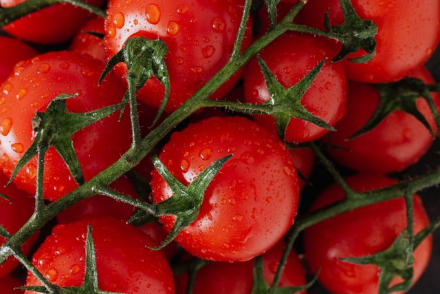
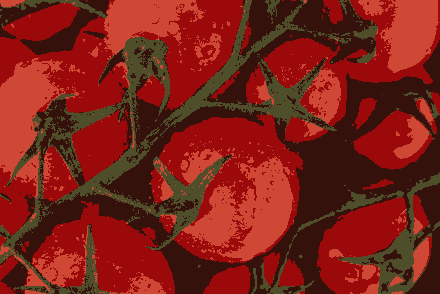
In this example, we reduce a close-up BMP photo of ripe tomatoes to the four colors of a 2-bit color set, where two bits can represent 2², or four, distinct values. We use automatic color reduction and set the output color count to 4, which changes only the bitmap's visible palette, not its bit depth. As a result, the photo is redrawn using just tomato red, dark brown, muted taupe, and pale pink. (Source: Pexels.)
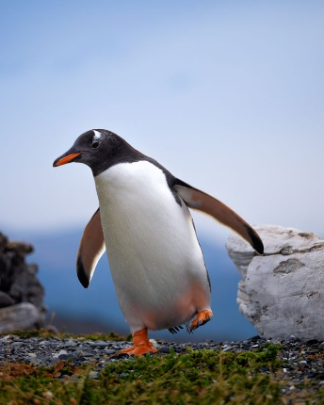
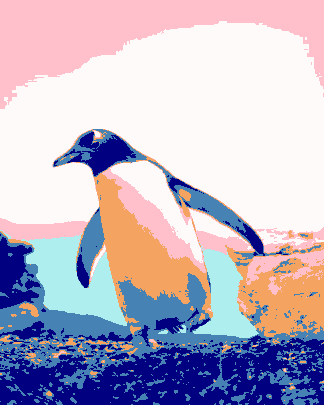
In this example, we apply a custom six-color palette to a BMP photo of a gentoo penguin standing between coastal rocks. We enter snow, steel blue, navy, pale turquoise, sandy brown, and pink as the only allowed colors. The white and pink tones shape the bird and sky; the blues define its head, wings, sea, and pebbled ground; and sandy brown adds warm areas to the body and rocks. (Source: Pexels.)
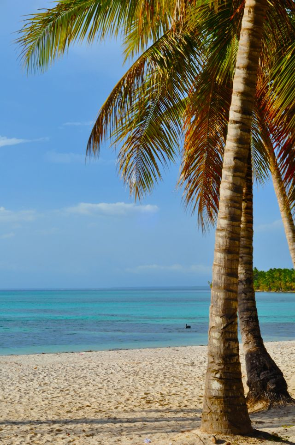
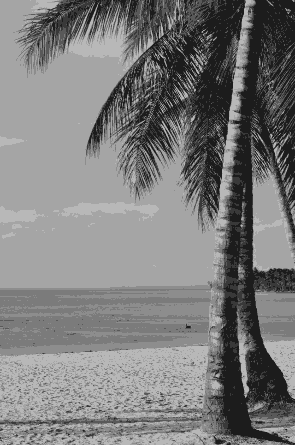
In this example, we convert a sunny tropical beach BMP to grayscale and reduce it to seven distinct gray tones. The tool first removes the original colors, then groups similar brightness levels and replaces them with a smaller set of representative shades. This creates a cleaner, simplified grayscale bitmap while preserving the main contrast, depth, and recognizable structure of the beach scene. (Source: Pexels.)
Create and edit bitmaps in your browser.
Make a bitmap smaller in size.
Convert a compressed bitmap to a raw RGB pixel bitmap.
Create a swirl of any radius in a bitmap.
Join two or more bitmaps together.
Place two or more bitmaps on top of each other.
Split a bitmap into multiple independent bitmaps.
Extract one or more selected areas from a bitmap.
Make copies of bitmaps and paste them together.
Skew a bitmap by an arbitrary angle.
Shift a bitmap to the left or right.
Convert a BMP to a Webp.
Convert a Webp to a BMP.
Convert a BMP to a PNG.
Convert a PNG to a BMP
Convert a BMP to a JPG.
Convert a JPG to a BMP.
Convert a BMP to a BPG.
Convert a BPG to a BMP.
Save GIF frames as BMP images.
Convert a bitmap to a single-frame GIF.
Create a Data URL scheme of a bitmap.
Convert a Data URL scheme back to a bitmap image.
Bit Blit two or more BMPs.
Put a new color table in a BMP.
Extract the color table of a BMP.
Extract raw RGB pixels from a BMP and print them out as text.
Create a bitmap image from raw RGB pixels.
Randomly rearrange colors in the BMP color table.
Reduce a BMP's memory footprint.
Destroy parts of a bitmap and make it glitchy.
Subscribe to our updates. We'll let you know when we release new tools and features, and when we organize online workshops.
Enter your email here
We're Browserling — a friendly and fun cross-browser testing company powered by alien technology. At Browserling, we love to make people's lives easier, so we created this collection of online bitmap tools. Our BMP tools have the simplest possible user interface and work directly in your browser without downloads or installations. You can use them to edit bitmap images, change BMP bit depth and colors, resize bitmaps, create transparent BMPs, work with bitmap pixels and byte arrays, and much more. Behind the scenes, our bitmap tools are powered by our web developer tools that we've created over the years. Check them out!