This is a free and fast online utility that converts bitmap images to 4-bit BMPs. Just load your BMP in the input, and the tool will reduce it to an indexed palette containing up to 16 colors. You can use the configuration options (below) to create a color, grayscale, or dithered bitmap, choose the RGB-to-gray formula for grayscale palettes, select a dithering algorithm, and set the background used for input transparency. Created by graphics designers from team Browserling.
This is a free and fast online utility that converts bitmap images to 4-bit BMPs. Just load your BMP in the input, and the tool will reduce it to an indexed palette containing up to 16 colors. You can use the configuration options (below) to create a color, grayscale, or dithered bitmap, choose the RGB-to-gray formula for grayscale palettes, select a dithering algorithm, and set the background used for input transparency. Created by graphics designers from team Browserling.
This free online browser-based program reduces a bitmap to the compact indexed 4-bit BMP format. It uses a small color palette instead of storing a full RGB value for every pixel. With four bits per pixel, an image can use up to 16 palette colors, numbered from 0 to 15. Each pixel stores its palette color index, and two pixel indices fit into a single byte. In the options, you can create a color or grayscale bitmap, with or without dithering. In color mode, the tool creates a palette of up to 16 representative colors and maps each pixel to the nearest one. Such a small palette can give photographs a bold, posterized appearance with flat areas instead of smooth shading. Grayscale mode uses 16 evenly spaced gray levels from black to white. Its brightness method can weight the RGB channels equally or assign them different weights to match perceived brightness better. Both color and grayscale modes also support dithering. Dithering spreads color differences across neighboring pixels, creating fine patterns that visually approximate shades unavailable in the palette. You can choose an error-diffusion pattern such as Floyd-Steinberg, Atkinson, Sierra, and several others. For images with transparency, you can also choose the background color applied before the 4-bit palette is created. Bmp-abulous!
This free online browser-based program reduces a bitmap to the compact indexed 4-bit BMP format. It uses a small color palette instead of storing a full RGB value for every pixel. With four bits per pixel, an image can use up to 16 palette colors, numbered from 0 to 15. Each pixel stores its palette color index, and two pixel indices fit into a single byte. In the options, you can create a color or grayscale bitmap, with or without dithering. In color mode, the tool creates a palette of up to 16 representative colors and maps each pixel to the nearest one. Such a small palette can give photographs a bold, posterized appearance with flat areas instead of smooth shading. Grayscale mode uses 16 evenly spaced gray levels from black to white. Its brightness method can weight the RGB channels equally or assign them different weights to match perceived brightness better. Both color and grayscale modes also support dithering. Dithering spreads color differences across neighboring pixels, creating fine patterns that visually approximate shades unavailable in the palette. You can choose an error-diffusion pattern such as Floyd-Steinberg, Atkinson, Sierra, and several others. For images with transparency, you can also choose the background color applied before the 4-bit palette is created. Bmp-abulous!
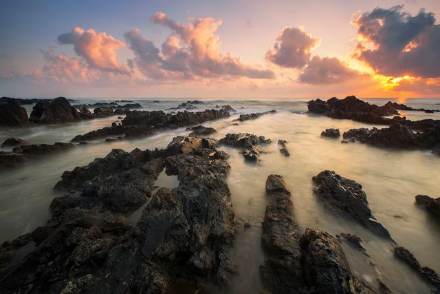
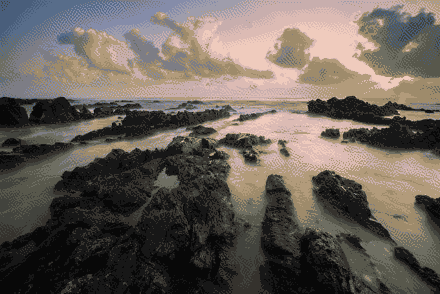
In this example, we reduce a 24-bit BMP of a rocky coast at sunset to a dithered 4-bit color bitmap. The program builds a 16-color palette and applies Atkinson dithering, distributing available colors across nearby pixels to imitate missing shades. The coast remains clearly recognizable, while the smooth sky and water gain a grainier texture, and the sunset colors become more muted. (Source: Pexels.)
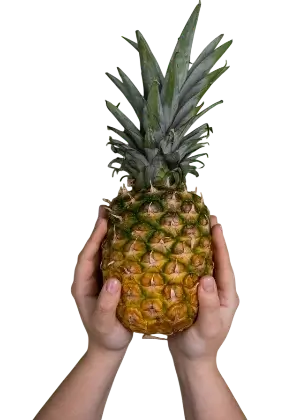
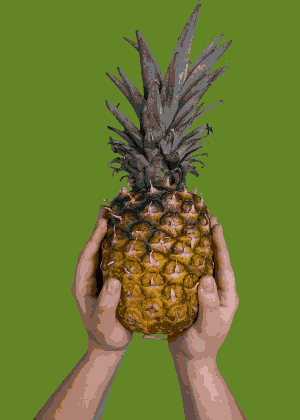
This example converts a transparent WebP of a pineapple held in two hands to a 4-bit color BMP without dithering. Because the 4-bit bitmap cannot preserve alpha transparency, we use an olive-green background to make the image fully opaque. The remaining colors are reduced to a 16-color palette, resulting in clearly visible color patches on the hands and pineapple leaves. (Source: Pexels.)
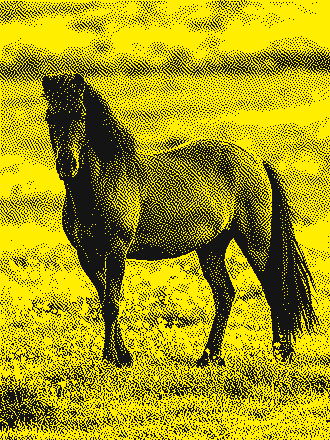
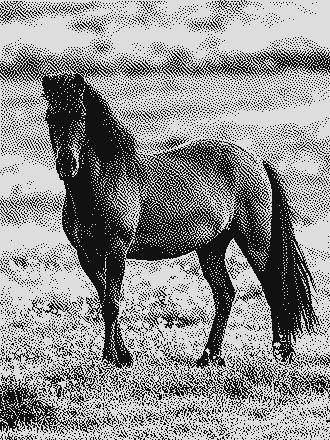
In this example, we convert a 1-bit BMP of a horse in a meadow to a 4-bit grayscale bitmap. The two source colors are converted to gray using the perceptual brightness method. Yellow areas become light gray, while dark-gray pixels become nearly black. The output supports 16 gray shades but uses only two, preserving the original dot pattern without restoring missing tones or detail. (Source: Pexels.)
Create and edit bitmaps in your browser.
Make a bitmap smaller in size.
Convert a compressed bitmap to a raw RGB pixel bitmap.
Create a swirl of any radius in a bitmap.
Join two or more bitmaps together.
Place two or more bitmaps on top of each other.
Split a bitmap into multiple independent bitmaps.
Extract one or more selected areas from a bitmap.
Make copies of bitmaps and paste them together.
Skew a bitmap by an arbitrary angle.
Shift a bitmap to the left or right.
Convert a BMP to a Webp.
Convert a Webp to a BMP.
Convert a BMP to a PNG.
Convert a PNG to a BMP
Convert a BMP to a JPG.
Convert a JPG to a BMP.
Convert a BMP to a BPG.
Convert a BPG to a BMP.
Save GIF frames as BMP images.
Convert a bitmap to a single-frame GIF.
Create a Data URL scheme of a bitmap.
Convert a Data URL scheme back to a bitmap image.
Bit Blit two or more BMPs.
Put a new color table in a BMP.
Extract the color table of a BMP.
Extract raw RGB pixels from a BMP and print them out as text.
Create a bitmap image from raw RGB pixels.
Randomly rearrange colors in the BMP color table.
Reduce a BMP's memory footprint.
Destroy parts of a bitmap and make it glitchy.
Subscribe to our updates. We'll let you know when we release new tools and features, and when we organize online workshops.
Enter your email here
We're Browserling — a friendly and fun cross-browser testing company powered by alien technology. At Browserling, we love to make people's lives easier, so we created this collection of online bitmap tools. Our BMP tools have the simplest possible user interface and work directly in your browser without downloads or installations. You can use them to edit bitmap images, change BMP bit depth and colors, resize bitmaps, create transparent BMPs, work with bitmap pixels and byte arrays, and much more. Behind the scenes, our bitmap tools are powered by our web developer tools that we've created over the years. Check them out!