This is a free and fast online utility that converts text symbols into colored pixels in a bitmap image. You can use the configuration options (below) to define symbol-to-color rules and set the size of each symbol-based pixel block. Extra options allow you to overlay a customizable cell grid and surround the bitmap with a frame of the specified thickness. Created by graphics designers from team Browserling.
This is a free and fast online utility that converts text symbols into colored pixels in a bitmap image. You can use the configuration options (below) to define symbol-to-color rules and set the size of each symbol-based pixel block. Extra options allow you to overlay a customizable cell grid and surround the bitmap with a frame of the specified thickness. Created by graphics designers from team Browserling.

This free online browser-based program converts a pattern of text symbols into a bitmap image. It maps symbols to bitmap pixels by assigning a color to each character, such as "x=navy", "y=white", or "o=#ffb347", and replacing every occurrence of that character with a pixel of the specified color in the resulting BMP image. By arranging the symbols into lines, you can quickly draw pixel art, bitmap sprites, retro game characters, creatures, and other grid-based artwork. For example, you can use one symbol for a character's outline, another for their skin, and several more for clothing, hair, weapons, shadows, and background details, making it easy to create your own small bitmap scenes and sprite characters from plain text. By default, each input line forms one bitmap row. If the input is written as one continuous sequence, you can enter how many symbols should appear in each row, and the program will automatically wrap the sequence into a rectangular bitmap. When line lengths differ, the longest line determines the bitmap width. Symbols that do not have a matching color rule, as well as unfilled positions at the ends of shorter rows, are painted using the selected unmapped area color. To make the bitmap easier to inspect, you can increase the block size, which enlarges every logical symbol pixel into a square block of BMP pixels while keeping the edges sharp. You can also show a cell grid to outline each scaled symbol pixel and choose the grid color for better visibility. If needed, you can add a bitmap frame, which places extra space around all four sides of the image, and specify the frame thickness in pixels. Bmp-abulous!
This free online browser-based program converts a pattern of text symbols into a bitmap image. It maps symbols to bitmap pixels by assigning a color to each character, such as "x=navy", "y=white", or "o=#ffb347", and replacing every occurrence of that character with a pixel of the specified color in the resulting BMP image. By arranging the symbols into lines, you can quickly draw pixel art, bitmap sprites, retro game characters, creatures, and other grid-based artwork. For example, you can use one symbol for a character's outline, another for their skin, and several more for clothing, hair, weapons, shadows, and background details, making it easy to create your own small bitmap scenes and sprite characters from plain text. By default, each input line forms one bitmap row. If the input is written as one continuous sequence, you can enter how many symbols should appear in each row, and the program will automatically wrap the sequence into a rectangular bitmap. When line lengths differ, the longest line determines the bitmap width. Symbols that do not have a matching color rule, as well as unfilled positions at the ends of shorter rows, are painted using the selected unmapped area color. To make the bitmap easier to inspect, you can increase the block size, which enlarges every logical symbol pixel into a square block of BMP pixels while keeping the edges sharp. You can also show a cell grid to outline each scaled symbol pixel and choose the grid color for better visibility. If needed, you can add a bitmap frame, which places extra space around all four sides of the image, and specify the frame thickness in pixels. Bmp-abulous!
In this example, we convert a 20-by-19 grid of digits into a colorful watermelon slice. Seven symbol rules assign sky blue to "0", black and white to the outline, two shades of red to the fruit, and two shades of green to the rind. As every input line is exactly 20 characters long, we leave the row width empty and use the existing line breaks to arrange the bitmap. A block size of 12 expands the symbol design into a crisp 240×228 BMP without grid lines or extra framing.

In this example, we construct a Pikachu sprite from a 48-by-50 character map. Periods create the white background, while ten letter symbols represent the yellows, browns, reds, highlights, and dark outlines used for Pikachu's body and details. The equal-length input lines determine the bitmap width automatically, while a block size of 7 enlarges each symbol pixel and a 10-pixel white frame adds space around the finished sprite. (Source: Nintendo.)

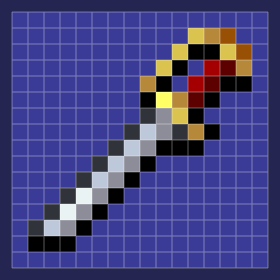
This example creates Alucard's Sword (from the Castlevania game) from one continuous sequence of 256 symbols. Instead of relying on line breaks, we set the row width to 16, which wraps the sequence into a 16×16 symbol map. The color rules form a dark-blue field, a black contour, a silver blade, and a gold-and-red hilt. We enlarge each symbol pixel into a 16×16 block, add a light grid that separates the cells, and create a 12-pixel dark-blue frame around the BMP. (Source: Konami.)
Create and edit bitmaps in your browser.
Make a bitmap smaller in size.
Convert a compressed bitmap to a raw RGB pixel bitmap.
Create a swirl of any radius in a bitmap.
Join two or more bitmaps together.
Place two or more bitmaps on top of each other.
Split a bitmap into multiple independent bitmaps.
Extract one or more selected areas from a bitmap.
Make copies of bitmaps and paste them together.
Skew a bitmap by an arbitrary angle.
Shift a bitmap to the left or right.
Convert a BMP to a Webp.
Convert a Webp to a BMP.
Convert a BMP to a PNG.
Convert a PNG to a BMP
Convert a BMP to a JPG.
Convert a JPG to a BMP.
Convert a BMP to a BPG.
Convert a BPG to a BMP.
Save GIF frames as BMP images.
Convert a bitmap to a single-frame GIF.
Create a Data URL scheme of a bitmap.
Convert a Data URL scheme back to a bitmap image.
Bit Blit two or more BMPs.
Put a new color table in a BMP.
Extract the color table of a BMP.
Extract raw RGB pixels from a BMP and print them out as text.
Create a bitmap image from raw RGB pixels.
Randomly rearrange colors in the BMP color table.
Reduce a BMP's memory footprint.
Destroy parts of a bitmap and make it glitchy.
Subscribe to our updates. We'll let you know when we release new tools and features, and when we organize online workshops.
Enter your email here
We're Browserling — a friendly and fun cross-browser testing company powered by alien technology. At Browserling, we love to make people's lives easier, so we created this collection of online bitmap tools. Our BMP tools have the simplest possible user interface and work directly in your browser without downloads or installations. You can use them to edit bitmap images, change BMP bit depth and colors, resize bitmaps, create transparent BMPs, work with bitmap pixels and byte arrays, and much more. Behind the scenes, our bitmap tools are powered by our web developer tools that we've created over the years. Check them out!