This is a free and fast online utility that converts bitmap pixels from RGB channel order to BGR channel order. You can use the configuration options (below) to specify the bitmap's current channel order and choose any of the six channel orders for the output: RGB, RBG, GRB, GBR, BRG, or BGR. Created by graphics designers from team Browserling.
This is a free and fast online utility that converts bitmap pixels from RGB channel order to BGR channel order. You can use the configuration options (below) to specify the bitmap's current channel order and choose any of the six channel orders for the output: RGB, RBG, GRB, GBR, BRG, or BGR. Created by graphics designers from team Browserling.

This free online browser-based program converts the color channels of a bitmap from RGB order to BGR order. By default, it reads each input pixel as red (R), green (G), and blue (B), and rearranges the three channel values as blue (B), green (G), and red (R). In other words, it swaps the positions of the red (R) and blue (B) values. Raw pixel data in uncompressed 24-bit BMP files normally stores color bytes in BGR order. This conversion can fix errors in bitmap images where RGB bytes are accidentally packed as BGR bytes. In the options, you can select a different output order, including RBG, GRB, GBR, BRG, or RGB. If the input bitmap already contains rearranged color channels, you can also specify its current input order so that the program interprets the existing values correctly before converting them to the selected output order. Bmp-abulous!
This free online browser-based program converts the color channels of a bitmap from RGB order to BGR order. By default, it reads each input pixel as red (R), green (G), and blue (B), and rearranges the three channel values as blue (B), green (G), and red (R). In other words, it swaps the positions of the red (R) and blue (B) values. Raw pixel data in uncompressed 24-bit BMP files normally stores color bytes in BGR order. This conversion can fix errors in bitmap images where RGB bytes are accidentally packed as BGR bytes. In the options, you can select a different output order, including RBG, GRB, GBR, BRG, or RGB. If the input bitmap already contains rearranged color channels, you can also specify its current input order so that the program interprets the existing values correctly before converting them to the selected output order. Bmp-abulous!
In this example, we load a pixel sprite of Link from The Legend of Zelda and change its channel order from RGB to BGR. Standard 24-bit BMP pixel data stores the three color bytes as blue, green, and red. Therefore, this conversion recreates how the sprite would look if that BGR byte sequence were displayed directly as RGB channels without being decoded: the warm gold and brown tones become blue, while much of Link's green clothing stays green because the middle channel keeps its position. (Source: Nintendo.)


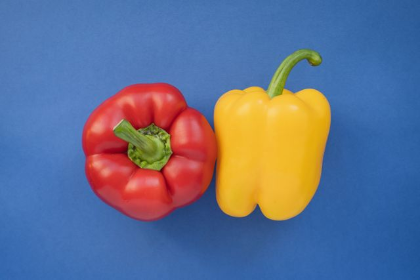
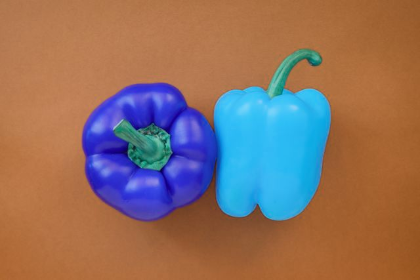
In this example, we convert an RGB bitmap of red and yellow peppers on a blue background to BGR order. Exchanging red and blue turns the blue background brownish orange, changes the red pepper to blue-violet, and makes the yellow pepper bright cyan. The green stems change much less because green remains in the middle position of color channels. (Source: Pexels.)
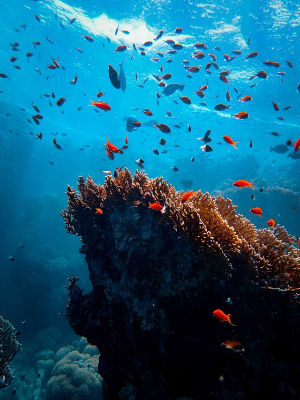
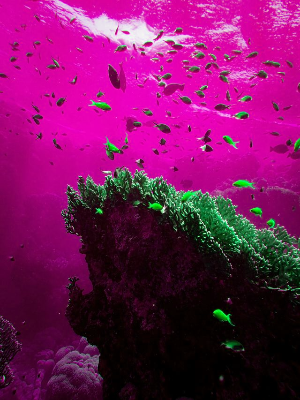
In this example, we select BRG as the new channel order for an underwater bitmap. Moving blue into the first position, red into the second, and green into the third turns the light-blue ocean pink and changes the red tropical fish to lime green. The black shadow areas of the coral reef remain unchanged because black has equal red, green, and blue values of zero. The same is true for every grayscale tone: as its three channel values are equal, rearranging them produces exactly the same color. (Source: Pexels.)
Create and edit bitmaps in your browser.
Make a bitmap smaller in size.
Convert a compressed bitmap to a raw RGB pixel bitmap.
Create a swirl of any radius in a bitmap.
Join two or more bitmaps together.
Place two or more bitmaps on top of each other.
Split a bitmap into multiple independent bitmaps.
Extract one or more selected areas from a bitmap.
Make copies of bitmaps and paste them together.
Skew a bitmap by an arbitrary angle.
Shift a bitmap to the left or right.
Convert a BMP to a Webp.
Convert a Webp to a BMP.
Convert a BMP to a PNG.
Convert a PNG to a BMP
Convert a BMP to a JPG.
Convert a JPG to a BMP.
Convert a BMP to a BPG.
Convert a BPG to a BMP.
Save GIF frames as BMP images.
Convert a bitmap to a single-frame GIF.
Create a Data URL scheme of a bitmap.
Convert a Data URL scheme back to a bitmap image.
Bit Blit two or more BMPs.
Put a new color table in a BMP.
Extract the color table of a BMP.
Extract raw RGB pixels from a BMP and print them out as text.
Create a bitmap image from raw RGB pixels.
Randomly rearrange colors in the BMP color table.
Reduce a BMP's memory footprint.
Destroy parts of a bitmap and make it glitchy.
Subscribe to our updates. We'll let you know when we release new tools and features, and when we organize online workshops.
Enter your email here
We're Browserling — a friendly and fun cross-browser testing company powered by alien technology. At Browserling, we love to make people's lives easier, so we created this collection of online bitmap tools. Our BMP tools have the simplest possible user interface and work directly in your browser without downloads or installations. You can use them to edit bitmap images, change BMP bit depth and colors, resize bitmaps, create transparent BMPs, work with bitmap pixels and byte arrays, and much more. Behind the scenes, our bitmap tools are powered by our web developer tools that we've created over the years. Check them out!