This is a free and fast online utility that flips BMP (bitmap) images horizontally. Just load your bitmap in the input editor, create a left-to-right reflection, and save the mirrored bitmap. Created by graphics designers from team Browserling.
This is a free and fast online utility that flips BMP (bitmap) images horizontally. Just load your bitmap in the input editor, create a left-to-right reflection, and save the mirrored bitmap. Created by graphics designers from team Browserling.
This free online browser-based program creates a left-to-right reflection of a BMP image. The transformation can be expressed with a simple coordinate rule: a pixel at (x, y) is copied to (width - x - 1, y). As the vertical coordinate stays unchanged, objects remain at the same height while their direction and horizontal position are reversed. This is useful for creating left-facing and right-facing game sprites, correcting photos captured in mirror mode, and viewing an asymmetric design from the opposite direction. Applying the tool twice returns every pixel to its original position. Keep in mind that text, numbers, and directional symbols in the bitmap will also appear backward. To turn the picture upside down instead, use our Flip a Bitmap Vertically tool. Bmp-abulous!
This free online browser-based program creates a left-to-right reflection of a BMP image. The transformation can be expressed with a simple coordinate rule: a pixel at (x, y) is copied to (width - x - 1, y). As the vertical coordinate stays unchanged, objects remain at the same height while their direction and horizontal position are reversed. This is useful for creating left-facing and right-facing game sprites, correcting photos captured in mirror mode, and viewing an asymmetric design from the opposite direction. Applying the tool twice returns every pixel to its original position. Keep in mind that text, numbers, and directional symbols in the bitmap will also appear backward. To turn the picture upside down instead, use our Flip a Bitmap Vertically tool. Bmp-abulous!
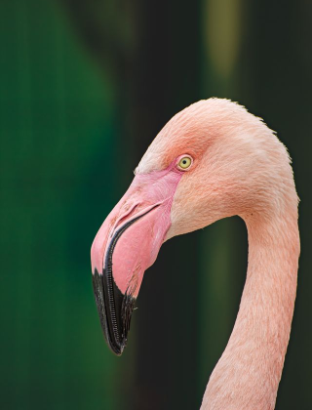
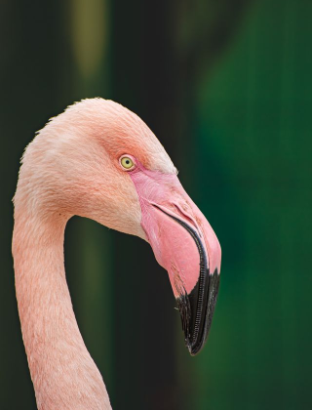
In this example, we horizontally flip a close-up BMP portrait of a pink flamingo. In the original image, the flamingo was looking to the left, but after the flip, it looks to the right. Its head and curved neck retain their vertical position while their left-to-right orientation is reversed. (Source: Pexels.)
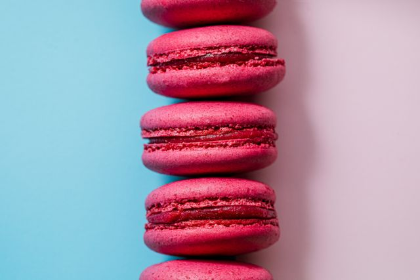
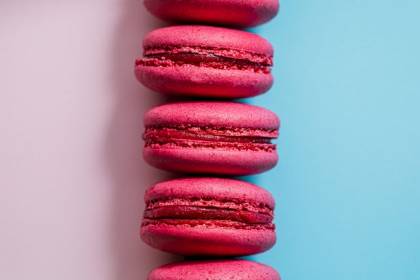
In this example, we horizontally flip a BMP image of pink macarons arranged in a vertical line. The pink and blue background areas switch places: the blue half moves from the left to the right, and the pink half moves from the right to the left. As the horizontal flip mirrors the bitmap across its vertical axis, the stack of macarons positioned on this axis remains centered between the two colors. (Source: Pexels.)
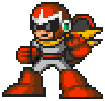
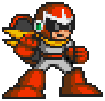
In this example, we horizontally flip a pixel-art BMP sprite of Proto Man. Initially, the character faces left and his yellow scarf extends to the right. After the flip, he faces right and the scarf trails behind him on the left. This creates an opposite-facing sprite without redrawing the character. (Source: Capcom.)
Create and edit bitmaps in your browser.
Make a bitmap smaller in size.
Convert a compressed bitmap to a raw RGB pixel bitmap.
Create a swirl of any radius in a bitmap.
Join two or more bitmaps together.
Place two or more bitmaps on top of each other.
Split a bitmap into multiple independent bitmaps.
Extract one or more selected areas from a bitmap.
Make copies of bitmaps and paste them together.
Skew a bitmap by an arbitrary angle.
Shift a bitmap to the left or right.
Convert a BMP to a Webp.
Convert a Webp to a BMP.
Convert a BMP to a PNG.
Convert a PNG to a BMP
Convert a BMP to a JPG.
Convert a JPG to a BMP.
Convert a BMP to a BPG.
Convert a BPG to a BMP.
Save GIF frames as BMP images.
Convert a bitmap to a single-frame GIF.
Create a Data URL scheme of a bitmap.
Convert a Data URL scheme back to a bitmap image.
Bit Blit two or more BMPs.
Put a new color table in a BMP.
Extract the color table of a BMP.
Extract raw RGB pixels from a BMP and print them out as text.
Create a bitmap image from raw RGB pixels.
Randomly rearrange colors in the BMP color table.
Reduce a BMP's memory footprint.
Destroy parts of a bitmap and make it glitchy.
Subscribe to our updates. We'll let you know when we release new tools and features, and when we organize online workshops.
Enter your email here
We're Browserling — a friendly and fun cross-browser testing company powered by alien technology. At Browserling, we love to make people's lives easier, so we created this collection of online bitmap tools. Our BMP tools have the simplest possible user interface and work directly in your browser without downloads or installations. You can use them to edit bitmap images, change BMP bit depth and colors, resize bitmaps, create transparent BMPs, work with bitmap pixels and byte arrays, and much more. Behind the scenes, our bitmap tools are powered by our web developer tools that we've created over the years. Check them out!