This is a free and fast online utility that redraws BMP images using classic VGA color palettes. You can use the configuration options below to choose between 16-color and 256-color VGA graphics and select the color-matching method. Extra options allow you to expand palette use and apply dithering for smoother VGA-style shading. Created by graphics designers from team Browserling.
This is a free and fast online utility that redraws BMP images using classic VGA color palettes. You can use the configuration options below to choose between 16-color and 256-color VGA graphics and select the color-matching method. Extra options allow you to expand palette use and apply dithering for smoother VGA-style shading. Created by graphics designers from team Browserling.

This free online browser-based program converts a BMP image to colors associated with VGA-era PC graphics. You can redraw a bitmap with either the compact VGA 16-color palette or a broader 256-color VGA palette. The 16-color mode uses familiar black, gray, white, dark primary colors, and their brighter variants. The 256-color palette offers many more hue and brightness levels, so photographs retain subtler shading while still getting a recognizable late-DOS and early-Windows appearance. Many VGA games used 16-color or 256-color graphics for sprites, backgrounds, and interface elements. Indexed BMP files use a closely related structure: 4-bit images can reference up to 16 colors, while 8-bit images can reference up to 256. This converter changes the visible colors but keeps the original BMP bit depth. If you need 4-bit or 8-bit indexed storage, use our Change Bitmap Depth tool. By default, each bitmap color is mapped to its nearest VGA color. Euclidean matching uses RGB distance, while perceptual matching selects the color that appears visually closer. The broader-palette option encourages more of the available VGA colors to appear when ordinary nearest-color mapping leaves many of them unused. For bitmaps with gradients, you can use dithering. It distributes approximation errors to neighboring pixels, creating fine pixel patterns that simulate colors and shades not directly available in the palette. You can select from several dithering methods, including Floyd-Steinberg, False Floyd-Steinberg, Stucki, Atkinson, and others. Bmp-abulous!
This free online browser-based program converts a BMP image to colors associated with VGA-era PC graphics. You can redraw a bitmap with either the compact VGA 16-color palette or a broader 256-color VGA palette. The 16-color mode uses familiar black, gray, white, dark primary colors, and their brighter variants. The 256-color palette offers many more hue and brightness levels, so photographs retain subtler shading while still getting a recognizable late-DOS and early-Windows appearance. Many VGA games used 16-color or 256-color graphics for sprites, backgrounds, and interface elements. Indexed BMP files use a closely related structure: 4-bit images can reference up to 16 colors, while 8-bit images can reference up to 256. This converter changes the visible colors but keeps the original BMP bit depth. If you need 4-bit or 8-bit indexed storage, use our Change Bitmap Depth tool. By default, each bitmap color is mapped to its nearest VGA color. Euclidean matching uses RGB distance, while perceptual matching selects the color that appears visually closer. The broader-palette option encourages more of the available VGA colors to appear when ordinary nearest-color mapping leaves many of them unused. For bitmaps with gradients, you can use dithering. It distributes approximation errors to neighboring pixels, creating fine pixel patterns that simulate colors and shades not directly available in the palette. You can select from several dithering methods, including Floyd-Steinberg, False Floyd-Steinberg, Stucki, Atkinson, and others. Bmp-abulous!
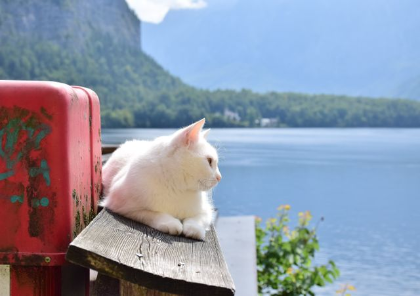
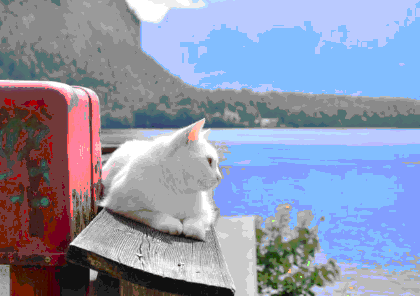
In this example, we redraw a lakeside cat bitmap with the 256-color VGA palette. We apply classic Euclidean color matching to compare the bitmap colors with the palette and use the VGA tones that best fit the BMP's lakeside atmosphere. As a result, the image separates into distinct color layers and gains the illustrated appearance of a hand-painted VGA adventure-game scene. (Source: Pexels.)
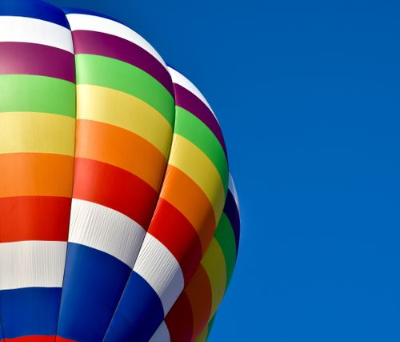
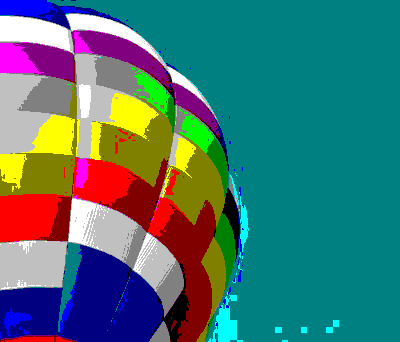
This example turns a balloon BMP into bold 16-color VGA artwork. We enable full palette use in the options, making all 16 VGA colors available for recreating the colorful balloon against the sky. As a result, the image showcases the complete range of colors in the classic VGA 16-color palette. (Source: Pexels.)
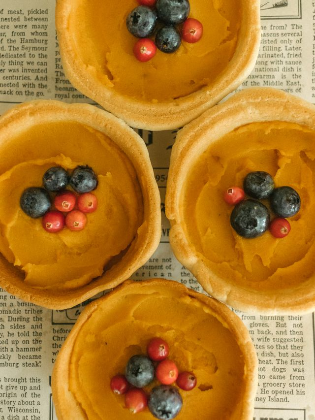
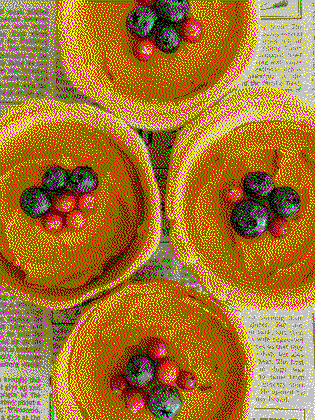
In this example, we redraw a bitmap with the full 16-color VGA palette and apply Jarvis dithering to add apparent shades to the tart filling, berries, and printed paper. The result has the grainy shading once used in old computer games to add visual detail to limited-color BMP sprites, backgrounds, and interface graphics. (Source: Pexels.)
Create and edit bitmaps in your browser.
Make a bitmap smaller in size.
Convert a compressed bitmap to a raw RGB pixel bitmap.
Create a swirl of any radius in a bitmap.
Join two or more bitmaps together.
Place two or more bitmaps on top of each other.
Split a bitmap into multiple independent bitmaps.
Extract one or more selected areas from a bitmap.
Make copies of bitmaps and paste them together.
Skew a bitmap by an arbitrary angle.
Shift a bitmap to the left or right.
Convert a BMP to a Webp.
Convert a Webp to a BMP.
Convert a BMP to a PNG.
Convert a PNG to a BMP
Convert a BMP to a JPG.
Convert a JPG to a BMP.
Convert a BMP to a BPG.
Convert a BPG to a BMP.
Save GIF frames as BMP images.
Convert a bitmap to a single-frame GIF.
Create a Data URL scheme of a bitmap.
Convert a Data URL scheme back to a bitmap image.
Bit Blit two or more BMPs.
Put a new color table in a BMP.
Extract the color table of a BMP.
Extract raw RGB pixels from a BMP and print them out as text.
Create a bitmap image from raw RGB pixels.
Randomly rearrange colors in the BMP color table.
Reduce a BMP's memory footprint.
Destroy parts of a bitmap and make it glitchy.
Subscribe to our updates. We'll let you know when we release new tools and features, and when we organize online workshops.
Enter your email here
We're Browserling — a friendly and fun cross-browser testing company powered by alien technology. At Browserling, we love to make people's lives easier, so we created this collection of online bitmap tools. Our BMP tools have the simplest possible user interface and work directly in your browser without downloads or installations. You can use them to edit bitmap images, change BMP bit depth and colors, resize bitmaps, create transparent BMPs, work with bitmap pixels and byte arrays, and much more. Behind the scenes, our bitmap tools are powered by our web developer tools that we've created over the years. Check them out!