This is a free and fast online utility that converts bitmap images to 8-bit BMPs. Just load your image, and the tool will reduce the image to a palette of up to 256 colors and store each pixel as a one-byte palette index. You can use the configuration options (below) to keep the image in color or create a grayscale bitmap, select how RGB values become gray, and choose a background for transparent areas. Created by graphics designers from team Browserling.
This is a free and fast online utility that converts bitmap images to 8-bit BMPs. Just load your image, and the tool will reduce the image to a palette of up to 256 colors and store each pixel as a one-byte palette index. You can use the configuration options (below) to keep the image in color or create a grayscale bitmap, select how RGB values become gray, and choose a background for transparent areas. Created by graphics designers from team Browserling.

This free online browser-based program converts images to the indexed 8-bit BMP format. Unlike 16-bit, 24-bit, and 32-bit bitmaps, an 8-bit BMP does not store a complete color value in every pixel. Instead, each pixel contains a one-byte index that points to an entry in a palette of up to 256 colors. In color mode, the tool analyzes the source image, creates a representative palette, and maps every pixel to the closest available palette color. This greatly reduces the amount of pixel data, but images with thousands or millions of original colors may show simplified shades and color transitions. You can also create an 8-bit grayscale BMP, in which the palette contains shades of gray rather than colors. For grayscale conversion, the options include Simple Average, which treats the RGB channels equally, and Natural Grayscale or Classic Grayscale, which use weighted formulas to reflect perceived brightness better. Because the 8-bit BMP output has no alpha transparency, you can select a background color that is applied to transparent and partially transparent parts before the color palette is generated. Bmp-abulous!
This free online browser-based program converts images to the indexed 8-bit BMP format. Unlike 16-bit, 24-bit, and 32-bit bitmaps, an 8-bit BMP does not store a complete color value in every pixel. Instead, each pixel contains a one-byte index that points to an entry in a palette of up to 256 colors. In color mode, the tool analyzes the source image, creates a representative palette, and maps every pixel to the closest available palette color. This greatly reduces the amount of pixel data, but images with thousands or millions of original colors may show simplified shades and color transitions. You can also create an 8-bit grayscale BMP, in which the palette contains shades of gray rather than colors. For grayscale conversion, the options include Simple Average, which treats the RGB channels equally, and Natural Grayscale or Classic Grayscale, which use weighted formulas to reflect perceived brightness better. Because the 8-bit BMP output has no alpha transparency, you can select a background color that is applied to transparent and partially transparent parts before the color palette is generated. Bmp-abulous!
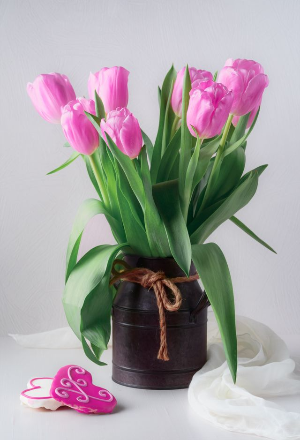
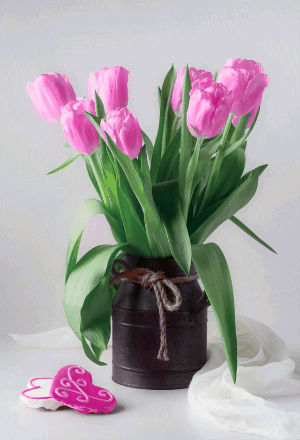
In this example, we reduce a 24-bit BMP photo of pink tulips to an 8-bit color bitmap. The original image can use millions of RGB colors, while the output is limited to a palette of at most 256 representative colors and stores each pixel as a one-byte palette index. Most of the photo remains close to the original, but some subtle tones are lost; for example, the bow around the vase becomes noticeably duller because its warmer shades are no longer available in the reduced palette. The smaller pixel format also cuts the file size from about 397 KB to 135 KB. (Source: Pexels.)
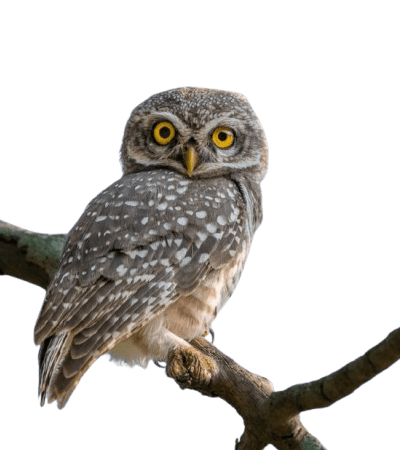
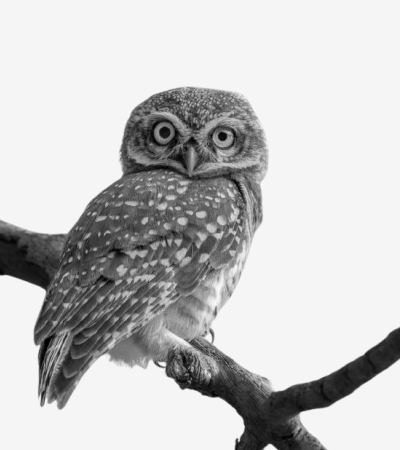
In this example, we convert a transparent PNG of an owl on a branch to an 8-bit grayscale BMP. We first blend the transparent areas with a whitesmoke background, then apply classic grayscale using 30% red, 59% green, and 11% blue. The new BMP uses a grayscale palette with up to 256 shades, and every pixel stores a one-byte reference to one of these gray values. (Source: Pexels.)
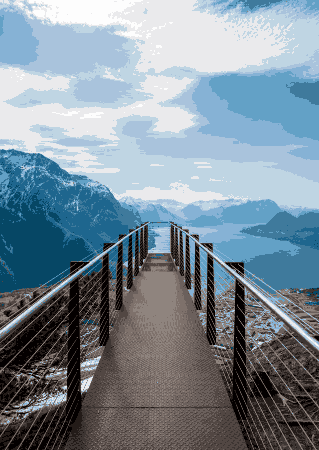
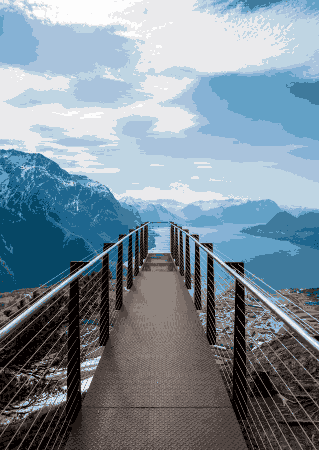
In this example, we convert a patchy 4-bit BMP of a mountain fjord to an 8-bit color bitmap. With only 16 colors available in the original palette, the image has a simplified, uneven color appearance. During conversion, these colors are carried over to the new palette, and the pixel indexes are expanded from 4 bits to 1 byte. Although the 8-bit format supports up to 256 colors, it cannot restore missing shades, so the bitmap keeps its patchy appearance. (Source: Pexels.)
Create and edit bitmaps in your browser.
Make a bitmap smaller in size.
Convert a compressed bitmap to a raw RGB pixel bitmap.
Create a swirl of any radius in a bitmap.
Join two or more bitmaps together.
Place two or more bitmaps on top of each other.
Split a bitmap into multiple independent bitmaps.
Extract one or more selected areas from a bitmap.
Make copies of bitmaps and paste them together.
Skew a bitmap by an arbitrary angle.
Shift a bitmap to the left or right.
Convert a BMP to a Webp.
Convert a Webp to a BMP.
Convert a BMP to a PNG.
Convert a PNG to a BMP
Convert a BMP to a JPG.
Convert a JPG to a BMP.
Convert a BMP to a BPG.
Convert a BPG to a BMP.
Save GIF frames as BMP images.
Convert a bitmap to a single-frame GIF.
Create a Data URL scheme of a bitmap.
Convert a Data URL scheme back to a bitmap image.
Bit Blit two or more BMPs.
Put a new color table in a BMP.
Extract the color table of a BMP.
Extract raw RGB pixels from a BMP and print them out as text.
Create a bitmap image from raw RGB pixels.
Randomly rearrange colors in the BMP color table.
Reduce a BMP's memory footprint.
Destroy parts of a bitmap and make it glitchy.
Subscribe to our updates. We'll let you know when we release new tools and features, and when we organize online workshops.
Enter your email here
We're Browserling — a friendly and fun cross-browser testing company powered by alien technology. At Browserling, we love to make people's lives easier, so we created this collection of online bitmap tools. Our BMP tools have the simplest possible user interface and work directly in your browser without downloads or installations. You can use them to edit bitmap images, change BMP bit depth and colors, resize bitmaps, create transparent BMPs, work with bitmap pixels and byte arrays, and much more. Behind the scenes, our bitmap tools are powered by our web developer tools that we've created over the years. Check them out!