This is a free and fast online utility that converts a bitmap to black-and-white colors. You can use the configuration options (below) to choose the light and dark pixel colors and enable dithering to preserve more image detail. Extra options allow you to select the diffusion pattern used to distribute the two colors across the BMP. Created by graphics designers from team Browserling.
This is a free and fast online utility that converts a bitmap to black-and-white colors. You can use the configuration options (below) to choose the light and dark pixel colors and enable dithering to preserve more image detail. Extra options allow you to select the diffusion pattern used to distribute the two colors across the BMP. Created by graphics designers from team Browserling.
This free online browser-based tool converts a bitmap to black and white colors. Unlike grayscale conversion, which keeps many gray shades, a black-and-white bitmap uses only two colors. To create it, the program checks the brightness of each source pixel and assigns it to either the light or dark color. A simple binary conversion creates solid white and black regions with sharp boundaries and a high-contrast look. To preserve more detail, you can enable dithering, which mixes light and dark pixels in patterns that simulate additional brightness levels while still using only two colors. The dithering style can be adjusted with several diffusion patterns, including Floyd-Steinberg, Atkinson, Stucki, Jarvis, Burkes, and Sierra variations. The two output colors do not have to be black and white – you can replace them with any light and dark colors to create a custom two-color BMP. If you want to keep continuous gray tones instead, use our Convert a Bitmap to Grayscale. Bmp-abulous!
This free online browser-based tool converts a bitmap to black and white colors. Unlike grayscale conversion, which keeps many gray shades, a black-and-white bitmap uses only two colors. To create it, the program checks the brightness of each source pixel and assigns it to either the light or dark color. A simple binary conversion creates solid white and black regions with sharp boundaries and a high-contrast look. To preserve more detail, you can enable dithering, which mixes light and dark pixels in patterns that simulate additional brightness levels while still using only two colors. The dithering style can be adjusted with several diffusion patterns, including Floyd-Steinberg, Atkinson, Stucki, Jarvis, Burkes, and Sierra variations. The two output colors do not have to be black and white – you can replace them with any light and dark colors to create a custom two-color BMP. If you want to keep continuous gray tones instead, use our Convert a Bitmap to Grayscale. Bmp-abulous!
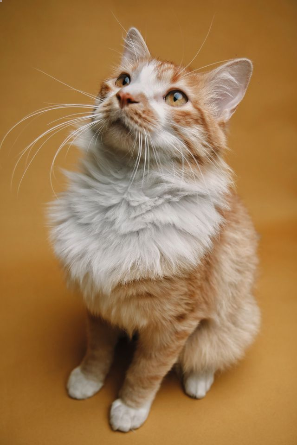
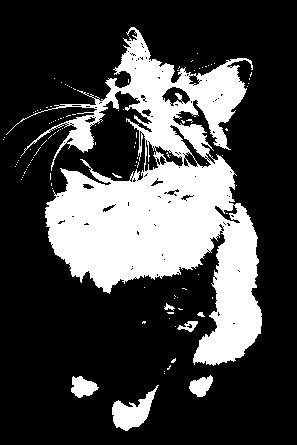
In this example, we turn a ginger cat photo into a stark black-and-white bitmap portrait. The cat's lighter fur becomes white, while the background and darker areas appear in solid black, creating a high-contrast BMP with a bold, poster-like look. (Source: Pexels.)
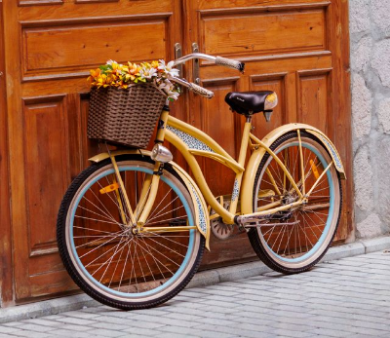
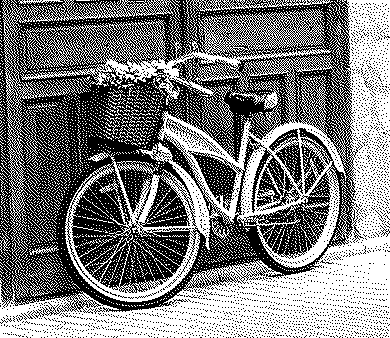
In this example, we convert a vintage bicycle bitmap into a black-and-white bitmap using Stucki dithering. The distributed pixel pattern preserves fine details such as the wheel spokes, flower basket, wooden door texture, and uneven pavement while reducing the image to just black and white. (Source: Pexels.)
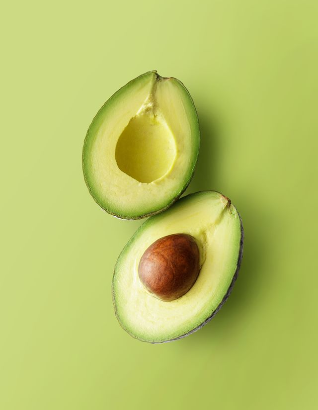
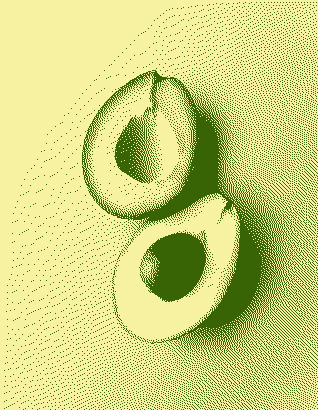
In this example, we replace the usual black-and-white bitmap colors with custom pale yellow and dark green tones chosen from the palette options. We use Sierra Lite dithering to vary the density of dark green pixels and form lighter and darker areas, preserving the shape of the avocado, its pit, peel, and shadows with only two colors. (Source: Pexels.)
Create and edit bitmaps in your browser.
Make a bitmap smaller in size.
Convert a compressed bitmap to a raw RGB pixel bitmap.
Create a swirl of any radius in a bitmap.
Join two or more bitmaps together.
Place two or more bitmaps on top of each other.
Split a bitmap into multiple independent bitmaps.
Extract one or more selected areas from a bitmap.
Make copies of bitmaps and paste them together.
Skew a bitmap by an arbitrary angle.
Shift a bitmap to the left or right.
Convert a BMP to a Webp.
Convert a Webp to a BMP.
Convert a BMP to a PNG.
Convert a PNG to a BMP
Convert a BMP to a JPG.
Convert a JPG to a BMP.
Convert a BMP to a BPG.
Convert a BPG to a BMP.
Save GIF frames as BMP images.
Convert a bitmap to a single-frame GIF.
Create a Data URL scheme of a bitmap.
Convert a Data URL scheme back to a bitmap image.
Bit Blit two or more BMPs.
Put a new color table in a BMP.
Extract the color table of a BMP.
Extract raw RGB pixels from a BMP and print them out as text.
Create a bitmap image from raw RGB pixels.
Randomly rearrange colors in the BMP color table.
Reduce a BMP's memory footprint.
Destroy parts of a bitmap and make it glitchy.
Subscribe to our updates. We'll let you know when we release new tools and features, and when we organize online workshops.
Enter your email here
We're Browserling — a friendly and fun cross-browser testing company powered by alien technology. At Browserling, we love to make people's lives easier, so we created this collection of online bitmap tools. Our BMP tools have the simplest possible user interface and work directly in your browser without downloads or installations. You can use them to edit bitmap images, change BMP bit depth and colors, resize bitmaps, create transparent BMPs, work with bitmap pixels and byte arrays, and much more. Behind the scenes, our bitmap tools are powered by our web developer tools that we've created over the years. Check them out!