This is a free and fast online utility that converts bitmap images to 32-bit BMPs. Just load your BMP in the input, and the tool will rewrite its pixels in a four-byte-per-pixel format with 8-bit red, green, and blue color channels and one additional padding byte. You can use the configuration options (below) to choose a background color for transparent and semi-transparent areas. Created by graphics designers from team Browserling.
This is a free and fast online utility that converts bitmap images to 32-bit BMPs. Just load your BMP in the input, and the tool will rewrite its pixels in a four-byte-per-pixel format with 8-bit red, green, and blue color channels and one additional padding byte. You can use the configuration options (below) to choose a background color for transparent and semi-transparent areas. Created by graphics designers from team Browserling.
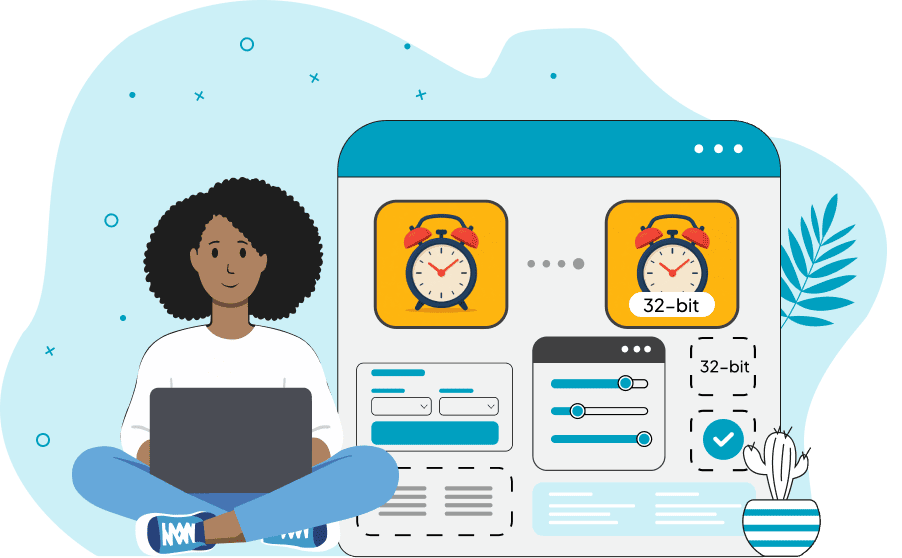
This free online browser-based program converts a bitmap image to a 32-bit BMP. A 32-bit bitmap stores every pixel in four bytes: eight bits for blue, green, and red, plus one additional byte. Depending on the BMP format, this fourth byte can store transparency information or remain unused. Even when it is unused, the four-byte pixel layout is useful because every pixel has the same convenient 32-bit size, which makes bitmap data easier and often faster for software and graphics hardware to process. During conversion, the tool expands the source pixels to full 8-bit RGB color channels and writes them in this four-byte-per-pixel format. The resulting bitmap can represent up to 16.7 million RGB colors. The tool also accepts PNG and WebP images with transparent or semi-transparent areas. As the output BMP uses its fourth byte as padding rather than an alpha channel, the background color option lets you replace these areas with any solid color. Bmp-abulous!
This free online browser-based program converts a bitmap image to a 32-bit BMP. A 32-bit bitmap stores every pixel in four bytes: eight bits for blue, green, and red, plus one additional byte. Depending on the BMP format, this fourth byte can store transparency information or remain unused. Even when it is unused, the four-byte pixel layout is useful because every pixel has the same convenient 32-bit size, which makes bitmap data easier and often faster for software and graphics hardware to process. During conversion, the tool expands the source pixels to full 8-bit RGB color channels and writes them in this four-byte-per-pixel format. The resulting bitmap can represent up to 16.7 million RGB colors. The tool also accepts PNG and WebP images with transparent or semi-transparent areas. As the output BMP uses its fourth byte as padding rather than an alpha channel, the background color option lets you replace these areas with any solid color. Bmp-abulous!
In this example, we convert a 24-bit BMP photo of an orange-and-white sleeping cat to a 32-bit BMP. The original bitmap stores each pixel in three bytes, with one byte each for red, green, and blue. We add a fourth unused byte to every pixel, creating the convenient four-byte pixel layout commonly used by graphics software for fast and straightforward image processing. Since the RGB values themselves do not change, the cat's orange fur, white paws, pink nose, and dark bed remain visually identical after the conversion. (Source: Pexels.)


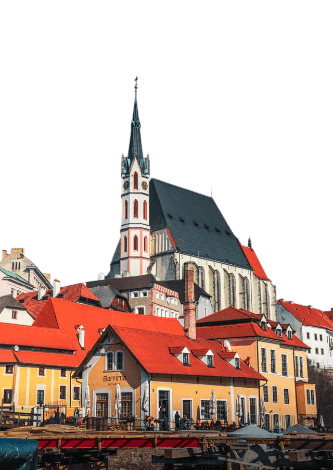
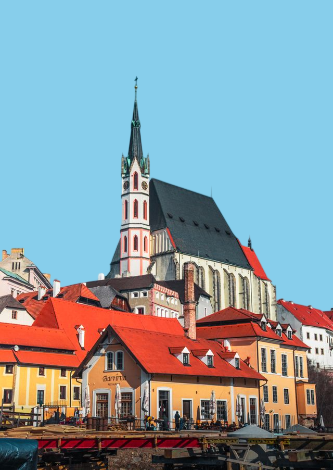
In this example, we convert a transparent 32-bit PNG of a historic church to a 32-bit BMP. The PNG stores red, green, blue, and transparency information in four 8-bit channels, but the fourth byte in the output BMP is used as padding rather than for transparency. We therefore set the background to sky blue (#87ceeb), filling the transparent area around the church with a color that naturally looks like a clear blue sky. (Source: Pexels.)
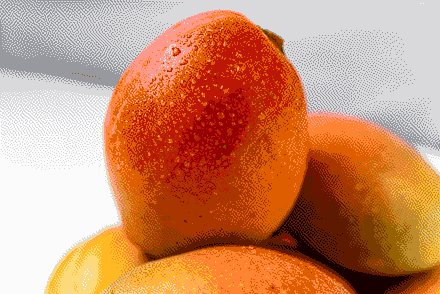
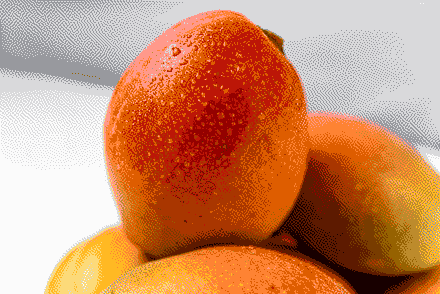
In this example, we convert a compact 4-bit indexed BMP of ripe mangoes to a 32-bit BMP. The source bitmap needs only four bits per pixel to reference colors in its small palette, while the 32-bit version writes every pixel directly using four bytes. This larger and more straightforward pixel format is easier for many graphics programs to process and work with. Although we expand the pixel data, we do not add any new color information, so the mangoes retain their limited palette and the visible dithering patterns. (Source: Pexels.)
Create and edit bitmaps in your browser.
Make a bitmap smaller in size.
Convert a compressed bitmap to a raw RGB pixel bitmap.
Create a swirl of any radius in a bitmap.
Join two or more bitmaps together.
Place two or more bitmaps on top of each other.
Split a bitmap into multiple independent bitmaps.
Extract one or more selected areas from a bitmap.
Make copies of bitmaps and paste them together.
Skew a bitmap by an arbitrary angle.
Shift a bitmap to the left or right.
Convert a BMP to a Webp.
Convert a Webp to a BMP.
Convert a BMP to a PNG.
Convert a PNG to a BMP
Convert a BMP to a JPG.
Convert a JPG to a BMP.
Convert a BMP to a BPG.
Convert a BPG to a BMP.
Save GIF frames as BMP images.
Convert a bitmap to a single-frame GIF.
Create a Data URL scheme of a bitmap.
Convert a Data URL scheme back to a bitmap image.
Bit Blit two or more BMPs.
Put a new color table in a BMP.
Extract the color table of a BMP.
Extract raw RGB pixels from a BMP and print them out as text.
Create a bitmap image from raw RGB pixels.
Randomly rearrange colors in the BMP color table.
Reduce a BMP's memory footprint.
Destroy parts of a bitmap and make it glitchy.
Subscribe to our updates. We'll let you know when we release new tools and features, and when we organize online workshops.
Enter your email here
We're Browserling — a friendly and fun cross-browser testing company powered by alien technology. At Browserling, we love to make people's lives easier, so we created this collection of online bitmap tools. Our BMP tools have the simplest possible user interface and work directly in your browser without downloads or installations. You can use them to edit bitmap images, change BMP bit depth and colors, resize bitmaps, create transparent BMPs, work with bitmap pixels and byte arrays, and much more. Behind the scenes, our bitmap tools are powered by our web developer tools that we've created over the years. Check them out!