This is a free and fast online utility that creates dithered bitmap images. You can use the configuration options below to choose the number of palette colors and select the dithering pattern used to distribute colors across the image. Extra options allow you to create grayscale dithering based only on pixel brightness. Created by graphics designers from team Browserling.
This is a free and fast online utility that creates dithered bitmap images. You can use the configuration options below to choose the number of palette colors and select the dithering pattern used to distribute colors across the image. Extra options allow you to create grayscale dithering based only on pixel brightness. Created by graphics designers from team Browserling.
This free online browser-based program creates dithered BMP images. When a bitmap uses only a few palette colors, simple color reduction can flatten gradients, shadows, and small details. Dithering helps preserve them by arranging available colors into tiny pixel patterns. For example, alternating black and white pixels can appear gray, while red and yellow pixels can suggest orange even when orange is not in the palette. The program replaces each source pixel with the closest palette color and spreads the remaining color difference to nearby pixels, forming dots and clusters that recreate missing shades and textures. Dithering can also be used creatively to give images a grainy, printed, pixel-art, or retro-computer look. Small palettes such as 2 to 8 colors create a strong effect, while 16 to 32 colors preserve more detail and larger palettes stay closer to the original. You can also choose from nine dithering patterns, including Floyd-Steinberg, Atkinson, Stucki, Jarvis, Burkes, and Sierra variants. Each pattern distributes color differences differently, changing the final texture. You can also dither the BMP in grayscale, creating patterns based only on pixel brightness rather than color. Bmp-abulous!
This free online browser-based program creates dithered BMP images. When a bitmap uses only a few palette colors, simple color reduction can flatten gradients, shadows, and small details. Dithering helps preserve them by arranging available colors into tiny pixel patterns. For example, alternating black and white pixels can appear gray, while red and yellow pixels can suggest orange even when orange is not in the palette. The program replaces each source pixel with the closest palette color and spreads the remaining color difference to nearby pixels, forming dots and clusters that recreate missing shades and textures. Dithering can also be used creatively to give images a grainy, printed, pixel-art, or retro-computer look. Small palettes such as 2 to 8 colors create a strong effect, while 16 to 32 colors preserve more detail and larger palettes stay closer to the original. You can also choose from nine dithering patterns, including Floyd-Steinberg, Atkinson, Stucki, Jarvis, Burkes, and Sierra variants. Each pattern distributes color differences differently, changing the final texture. You can also dither the BMP in grayscale, creating patterns based only on pixel brightness rather than color. Bmp-abulous!
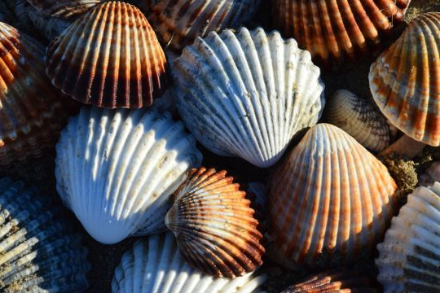
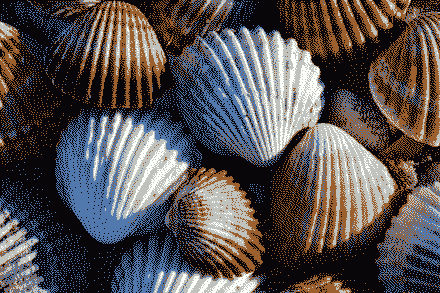
In this example, we dither a close-up bitmap of seashells using only five colors. The Burkes pattern distributes black, white, blue, tan, and brown pixels across the image, helping preserve the shells' curved shapes, ridges, and natural surface details while keeping the palette very small. (Source: Pexels.)
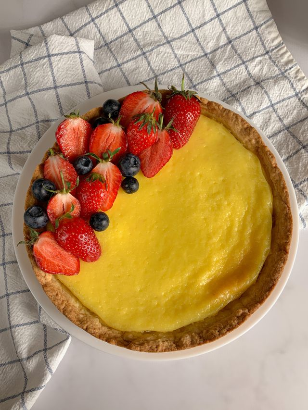
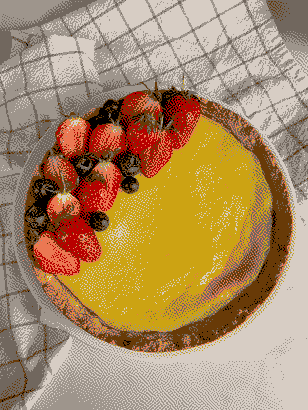
This example reduces a lemon tart bitmap to just eight palette colors and applies Atkinson dithering. The bright yellow color of the lemon filling and the red strawberries remain distinct. To make efficient use of the small palette, the same beige, gray, and brown shades form both the pastry crust and the checked towel pattern beneath the dessert. (Source: Pexels.)
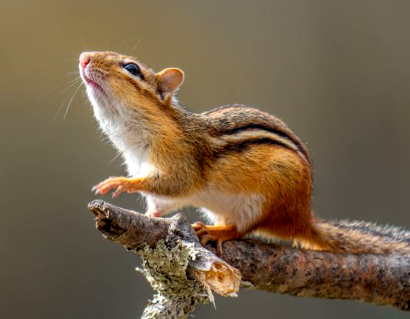
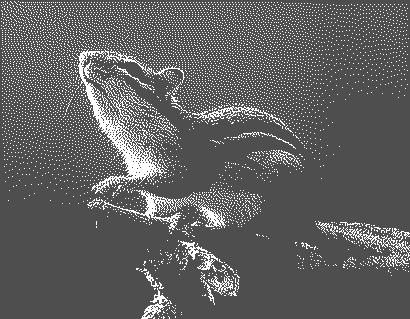
In this example, we convert a chipmunk bitmap to grayscale and dither it using just two tones and the Sierra pattern. The changing pixel density recreates the light rays across the animal's face and back while keeping its fur, outline, and the branch clearly visible. (Source: Pexels.)
Create and edit bitmaps in your browser.
Make a bitmap smaller in size.
Convert a compressed bitmap to a raw RGB pixel bitmap.
Create a swirl of any radius in a bitmap.
Join two or more bitmaps together.
Place two or more bitmaps on top of each other.
Split a bitmap into multiple independent bitmaps.
Extract one or more selected areas from a bitmap.
Make copies of bitmaps and paste them together.
Skew a bitmap by an arbitrary angle.
Shift a bitmap to the left or right.
Convert a BMP to a Webp.
Convert a Webp to a BMP.
Convert a BMP to a PNG.
Convert a PNG to a BMP
Convert a BMP to a JPG.
Convert a JPG to a BMP.
Convert a BMP to a BPG.
Convert a BPG to a BMP.
Save GIF frames as BMP images.
Convert a bitmap to a single-frame GIF.
Create a Data URL scheme of a bitmap.
Convert a Data URL scheme back to a bitmap image.
Bit Blit two or more BMPs.
Put a new color table in a BMP.
Extract the color table of a BMP.
Extract raw RGB pixels from a BMP and print them out as text.
Create a bitmap image from raw RGB pixels.
Randomly rearrange colors in the BMP color table.
Reduce a BMP's memory footprint.
Destroy parts of a bitmap and make it glitchy.
Subscribe to our updates. We'll let you know when we release new tools and features, and when we organize online workshops.
Enter your email here
We're Browserling — a friendly and fun cross-browser testing company powered by alien technology. At Browserling, we love to make people's lives easier, so we created this collection of online bitmap tools. Our BMP tools have the simplest possible user interface and work directly in your browser without downloads or installations. You can use them to edit bitmap images, change BMP bit depth and colors, resize bitmaps, create transparent BMPs, work with bitmap pixels and byte arrays, and much more. Behind the scenes, our bitmap tools are powered by our web developer tools that we've created over the years. Check them out!