This is a free and fast online utility that changes one color into another in BMP images. You can use the configuration options (below) to choose the original color and set the replacement color. Extra options allow you to adjust how closely nearby color tones should be matched, preserve light and dark details, smooth recolored pixel edges, and preview the matched pixels before saving the B. Created by graphics designers from team Browserling.
This is a free and fast online utility that changes one color into another in BMP images. You can use the configuration options (below) to choose the original color and set the replacement color. Extra options allow you to adjust how closely nearby color tones should be matched, preserve light and dark details, smooth recolored pixel edges, and preview the matched pixels before saving the B. Created by graphics designers from team Browserling.
This free online browser-based program changes colors in BMP (bitmap) images. It looks through every pixel in the bitmap, finds the color you want to replace, and repaints those pixels with the new color you choose. The old and new colors can be entered as simple color names, hex values, or RGB values, and you can also click directly on a pixel in the input bitmap to copy its color into the tool settings. If the color in your BMP is not perfectly flat, use the similarity percentage to include nearby tones as well. For example, replacing blue with green can also catch dusty blue, pale blue, navy shadows, and other bluish pixels when the percentage is increased. If light and dark areas define the shape, depth, or texture of the object, the option that keeps color details can preserve this visual information during recoloring. It keeps the original brightness of each matched pixel, so shadows, highlights, rounded edges, and surface details are carried into the new color. If small old-color specks remain around the border of the recolored region, enable boundary smoothing and set a small radius to blend the edge pixels. The preview mask option shows the matched pixels in black and the unchanged pixels in white, which makes it easy to tune the color and similarity before saving the final BMP. Additionally, this mask can be imported into Photoshop or GIMP and used for further editing, masking, or cleanup. Bmp-abulous!
This free online browser-based program changes colors in BMP (bitmap) images. It looks through every pixel in the bitmap, finds the color you want to replace, and repaints those pixels with the new color you choose. The old and new colors can be entered as simple color names, hex values, or RGB values, and you can also click directly on a pixel in the input bitmap to copy its color into the tool settings. If the color in your BMP is not perfectly flat, use the similarity percentage to include nearby tones as well. For example, replacing blue with green can also catch dusty blue, pale blue, navy shadows, and other bluish pixels when the percentage is increased. If light and dark areas define the shape, depth, or texture of the object, the option that keeps color details can preserve this visual information during recoloring. It keeps the original brightness of each matched pixel, so shadows, highlights, rounded edges, and surface details are carried into the new color. If small old-color specks remain around the border of the recolored region, enable boundary smoothing and set a small radius to blend the edge pixels. The preview mask option shows the matched pixels in black and the unchanged pixels in white, which makes it easy to tune the color and similarity before saving the final BMP. Additionally, this mask can be imported into Photoshop or GIMP and used for further editing, masking, or cleanup. Bmp-abulous!
In this example, we give a yellow flower bouquet a new bitmap background. We click the pale background in the input image to pick rgba(251, 244, 238, 255) as the color to replace, set the color sensitivity to 15%, and enter rgb(210, 177, 233) as the replacement color. We also smooth the boundary with a 1-pixel radius, which gently blends the tiny edge pixels into the new lavender background. (Source: Pexels.)


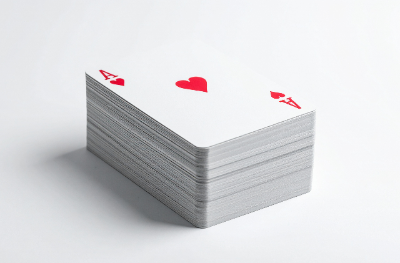
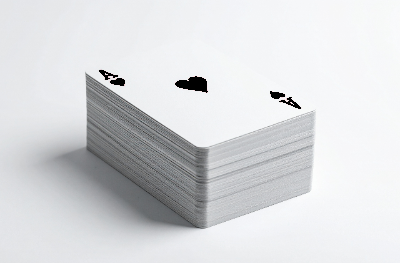
In this example, we recolor the red suit on a bitmap playing card. The input image contains a red ace of hearts, and the tool replaces its bright heart color with black. A 50% sensitivity value also catches the nearby red antialiasing pixels, so the heart symbol and the letter A become black while the white card faces stay unchanged. (Source: Vecteezy.com.)
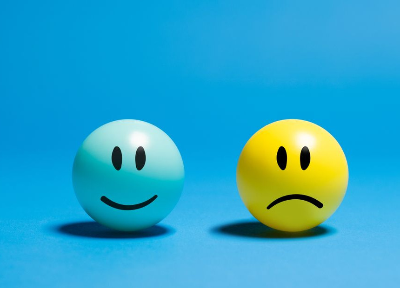
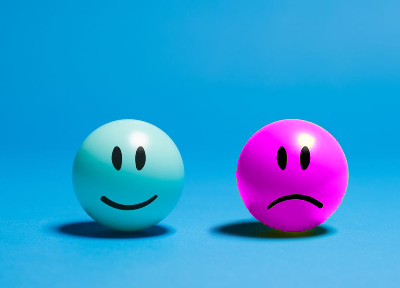
In this example, the bitmap contains two glossy smiley balls, one blue and one yellow. We choose the yellow smiley's base color rgba(164, 173, 18, 255), and change it to magenta with 40% sensitivity. To keep the smiley looking round and three-dimensional, we enable the option that preserves light and dark color details. (Source: Pexels.)
Create and edit bitmaps in your browser.
Make a bitmap smaller in size.
Convert a compressed bitmap to a raw RGB pixel bitmap.
Create a swirl of any radius in a bitmap.
Join two or more bitmaps together.
Place two or more bitmaps on top of each other.
Split a bitmap into multiple independent bitmaps.
Extract one or more selected areas from a bitmap.
Make copies of bitmaps and paste them together.
Skew a bitmap by an arbitrary angle.
Shift a bitmap to the left or right.
Convert a BMP to a Webp.
Convert a Webp to a BMP.
Convert a BMP to a PNG.
Convert a PNG to a BMP
Convert a BMP to a JPG.
Convert a JPG to a BMP.
Convert a BMP to a BPG.
Convert a BPG to a BMP.
Save GIF frames as BMP images.
Convert a bitmap to a single-frame GIF.
Create a Data URL scheme of a bitmap.
Convert a Data URL scheme back to a bitmap image.
Bit Blit two or more BMPs.
Put a new color table in a BMP.
Extract the color table of a BMP.
Extract raw RGB pixels from a BMP and print them out as text.
Create a bitmap image from raw RGB pixels.
Randomly rearrange colors in the BMP color table.
Reduce a BMP's memory footprint.
Destroy parts of a bitmap and make it glitchy.
Subscribe to our updates. We'll let you know when we release new tools and features, and when we organize online workshops.
Enter your email here
We're Browserling — a friendly and fun cross-browser testing company powered by alien technology. At Browserling, we love to make people's lives easier, so we created this collection of online bitmap tools. Our BMP tools have the simplest possible user interface and work directly in your browser without downloads or installations. You can use them to edit bitmap images, change BMP bit depth and colors, resize bitmaps, create transparent BMPs, work with bitmap pixels and byte arrays, and much more. Behind the scenes, our bitmap tools are powered by our web developer tools that we've created over the years. Check them out!